PayTo
Zenith supports PayTo, the real-time bank account payment solution built on the NPP (New Payment Platform).
PayTo enables a secure and fast way to process real‑time payments from Australian bank accounts with instant approval and without the current 3-day settlement delay.
Tokenised Integration Process Flow
Flow Diagram
Customer adds PayTo account to Wallet
- Zenith will enable PayTo so that it appears in the existing Payment Plugin, in Tokenisation mode.
- PayTo tab appears alongside existing methods, e.g. Card and Bank Account.
- You/merchants can decide to replace the current Bank Account option with PayTo or have both.
- Customers paying by Bank Account can continue to do so, even if it is decided to only offer PayTo when new accounts are added.
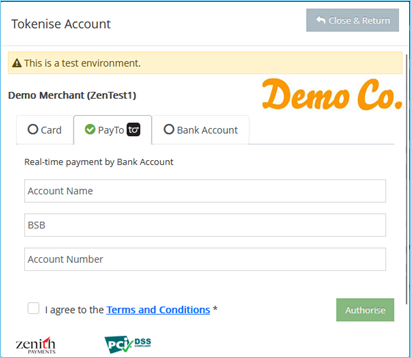
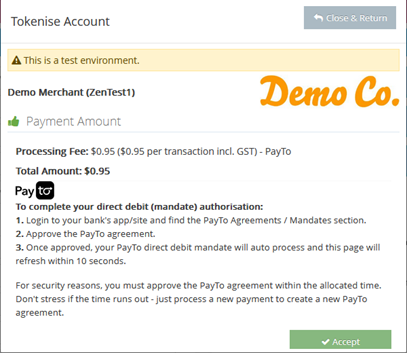
- Customer enters their Account Name, BSB, and Account Number and are instructed to approve the mandate in their banking APP.
- You receive a token / Payment Account Proxy, in the same way as for card or bank account.
- As the customer needs to approve the mandate in their bank APP, you should record / display the PayTo account in the customer’s wallet as “Pending Mandate Approval.”
Customer PayTo Mandate Approval
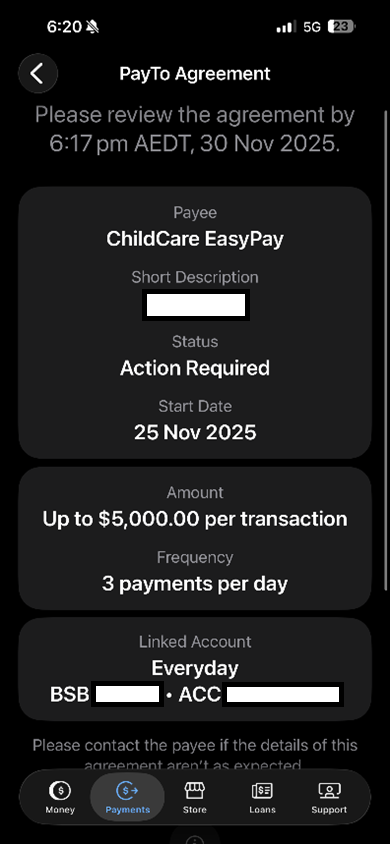
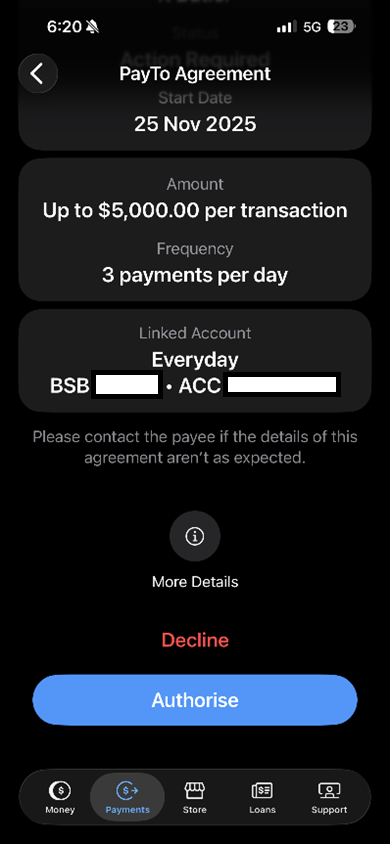
- The customer approves the PayTo mandate in their banking APP / site.
- This is a one-time only step, which confirms the customer’s authorisation and account ownership.
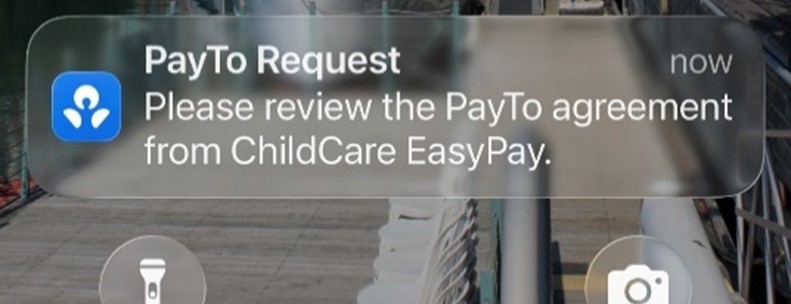
- The customer receives an email/SMS/app prompt from their bank to approve the PayTo agreement
- Each bank has different approaches – here are some examples:
PayTo Token Status – WebHook
- When the PayTo mandate is approved, declined or subsequently cancelled, Zenith will post a WebHook call which will also contain the current status.
Active PayTo token – WebHook Example:
{
  "Version": 1,
  "Event": "Edit",
  "PayloadType": "PayToProxy",
  "Payload": {
    "AccountType": "PayTo",
    "AccountName": "AppToken",
    "AccountNumber": "417529874",
    "BSB": "012204",
    "CardType": "PayTo",
    "PayToStatus": "Active",
    "Token": "b95045c7-bcb0-4f9b-8029-c1d3566c9883",
    "StatusDescription": null
  }
}
PayTo Token Status – API
-
You can also call an API to find out the status of a PayTo mandate.
-
Endpoint:
GET /v2/proxies/\{token\}— returns the current PayTo proxy status.
Active PayTo token – API Example Response:
{
  "accountType": "PayTo",
  "accountName": "AppToken",
  "accountNumber": "417529874",
  "bsb": "012204",
  "payToStatus": "Active",
  "cardType": "PayTo",
  "uId": "6b26376a-ca87-4734-ab6b-10cfc8f1b3ca"
}
Payment Processing
- There is no change required to payment processing – just send the PayTo token / proxy when you are processing a transaction.
- PayTo transactions will be instantly successful or failed.
- PayTo transactions processed before 8am SYD on business days will be settled to the merchant on the same day.
PayTo – Existing Integration Uplift
As you already utilise the Payment Plugin for tokenisation or one-off payments, you only need to do the following:
Pass PayTo parameter when loading Zenith Plugin
- For tokenisation and/or one off payments, pass: allowPayToOneOffPayment: true
- Upon entering their details in the plugin, the customer will be advised to approve their PayTo mandate in their bank app.
- If tokenising, when the customer selects PayTo and enters banking details, a token / proxy is created – in the same way as a card or bank account.
Handle PayTo Tokens
- Flag newly created PayTo tokens with a ‘Pending PayTo Mandate Approval’ status (or similar) in your system wallet / list of bank account pages.
- This ensures your customer knows that approval is required, in addition to the notification in the query and that their bank will send to them.
- We suggest you include wording in your system wallet (whilst PayTo account is Pending Mandate Approval) to remind the customer to activate their PayTo mandate in their bank App.
Support WebHook/API calls
- Receive and action the Zenith Customer WebHook which is triggered when the customer approves / declines / cancels the PayTo mandate in their bank app.
- You can also check the status of a PayTo token via API. Please see appendix below.
- When the customer approves their PayTo mandate, update the status of the PayTo bank account in your system wallet to ‘Active’ or similar.
- A customer can cancel their PayTo mandate at any time in their banking app. This will trigger a WebHook call to enable you to manage it.
- Alternatively, you can call our API to get status updates.
Payments
- No change – just pass the PayTo token in the same way you would pass a bank / card token.
Overview (Tokenisation)
- Launch plugin in Mode 1 (tokenise)
- Customer enters bank details, selects Tokenise
- Plugin authorises (Mode 1); token created as Pending
- Redirect and callback deliver token details
- Customer approves mandate in bank app
- Webhook or API calls indicate token is Active
- Your system can now charge the token
Participants: Customer → Browser/Plugin → Zenith Hosted Page → Bank App → Merchant Server
Mandate lifecycle and statuses
- Pending: Token created. Awaiting customer approval in banking app
- Active: Approved. safe to charge
- Paused: Account holder has paused the mandate, and the token cannot be charged until it becomes active again
- Cancelled: Account holder has cancelled the mandate, and the account will need to be re-tokenised
- Declined: Bank or customer has declined the mandate
How you know the current proxy status
- Webhooks: receive PayTo proxy events on changes
- API lookup:
GET /v2/proxies/\{token\}returns payToStatus
One-Off Integration
Pay-To acts like any other one-off payment method with the exception of a prompt for the customer to approve the payment via their banking portal or SMS notification. Once approval is given, the payment is made, and the mandate is cancelled. More detail about initial stages can be found in the above section on tokenising.